

In Part 2 I set up Parakeet as a streaming-capable ASR NIM for German and ran it as a live service with low latency. In this post I take on the sister model: NVIDIA Canary as a NIM. Canary does not shine at latency but at accuracy, and it can do something Parakeet cannot: translate. Produce English text directly from German audio, without a detour. This rounds out the ASR side of my local stack natively on NVIDIA. As always in this little series: everything local, on my own hardware, without the cloud.
What is NVIDIA Canary?
Canary is an attention encoder-decoder model (FastConformer encoder plus Transformer decoder), multilingual and multi-task: in a single model it handles both speech recognition (ASR) and speech translation (AST, Automatic Speech Translation). Its strengths are high accuracy and, precisely, translation.
An important difference from Parakeet: Canary runs in offline mode only. So there is no continuous streaming like with Parakeet. Canary takes the whole audio file (or the fully recorded buffer) and delivers the result afterwards. That is no good for a live voice agent, but it is ideal for maximum accuracy and for translation.
Canary or Parakeet – when to use which?
A quick classification so it is clear when you take which model:
| Criterion | Parakeet (Part 2) | Canary (this part) |
|---|---|---|
| Mode | Streaming + offline | offline / batch only |
| Latency | very low (live) | higher (whole file) |
| Strength | live transcription | accuracy |
| Translation | no | yes (AST, de↔en) |
| Typical use | voice agent, live captions | transcripts, highest accuracy, translation |
The goal of this post
We run the Canary NIM locally and use it to translate a German recording directly into English.
Requirements
If you have been through Part 2, the groundwork is already in place and we only reference it briefly:
- NGC account and API key,
docker logintonvcr.io(see Part 2) - the
riva-clientvenv withnvidia-riva-clientinstalled - the cloned
python-clientsrepository - GPU ≥ compute capability 8.0 – Canary 1B is small, so little VRAM is plenty
So you don’t need to install anything new. One important point: Canary and Parakeet use the same ports (9000/50051). You therefore cannot run both at the same time. Before this step, stop the Parakeet container (Ctrl + C in its terminal) or give Canary different ports.
Step 1: Start the Canary NIM
If your API key is no longer set in the current terminal session, set it again:
Command: export NGC_API_KEY="nvapi-xxxxxxxxxxxxxxxxxxxxx"
Then you pick the container and profile. Unlike Parakeet (mode=str), Canary only offers the offline mode mode=ofl:
Command: export CONTAINER_ID=canary-1b
Command: export NIM_TAGS_SELECTOR="mode=ofl"
Command: docker run -it --rm --name=$CONTAINER_ID --runtime=nvidia --gpus '"device=0"' --shm-size=8GB -e NGC_API_KEY -e NIM_HTTP_API_PORT=9000 -e NIM_GRPC_API_PORT=50051 -p 9000:9000 -p 50051:50051 -e NIM_TAGS_SELECTOR -v ~/.cache/nim:/opt/nim/.cache nvcr.io/nim/nvidia/$CONTAINER_ID:latest
You can reuse the cache directory ~/.cache/nim from Part 2. The first start takes a while here too (model download and TensorRT engine build, up to ~30 minutes depending on network and GPU). The service is ready once the “running” line, or rather “Application is ready to receive API requests”, appears in the logs.
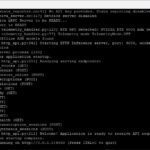
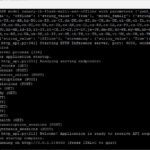
After you submit the docker run, a lot happens in sequence on the very first start, and that is exactly what scrolls past in the (admittedly very black) terminal. In order:
- Image download: Docker pulls the Canary container from
nvcr.io(the many “Pull complete” lines). - Profile selection: the NIM detects my GPU (RTX 6000 Ada, compute capability 8.9) and automatically picks the matching offline profile (
mode=ofl, RMIR format). - Model download: it downloads the actual model
asr-canary-1b-flash-multi-offline-trtllm.rmir(about 3.4 GB) into the cache. - Engine build: from the RMIR the container builds the optimized inference engines. For Canary this runs via TensorRT-LLM (encoder as a TensorRT engine, decoder via TensorRT-LLM) – this is the step that takes longest.
- Server start: Riva loads the models into Triton (“…waiting for Triton server…”) and then starts the gRPC server on port 50051 and the HTTP server on port 9000.
The service is ready once the line “Welcome! Application is ready to receive API requests.” appears. For me the complete first start took about ten minutes (download ~5 min, engine build ~5 min). The next start is much faster because the model is already cached.
The many warnings that scroll by (e.g. about pynvml, transformers/modelopt or a skipped TRT tactic) are cosmetic – all that matters is that the “ready” line comes at the end.
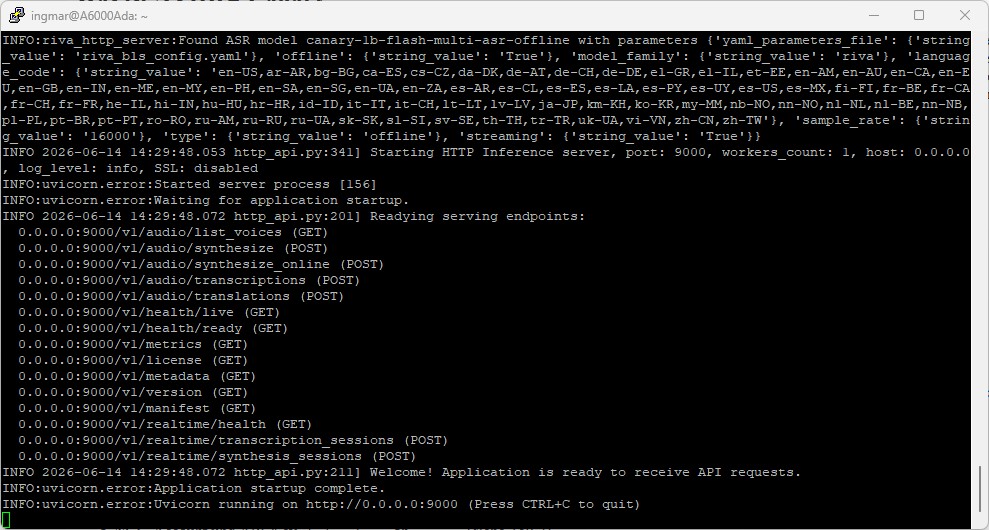
NVIDIA NIM container Canary setup
Note on container ID and profile:
Both containers we have met so far come from the current NIM ASR support matrix. Should NVIDIA rename the model or change profiles, you will find the valid values there or on the model page at build.nvidia.com.
Step 2: Check the container status
In a second terminal you check as usual whether the service is running.
Command: docker ps
Command: curl http://localhost:9000/v1/health/ready
If the health check answers with {"object":"health.response","message":"ready","status":"ready"}, your Canary microservice is up.
Step 3: Transcribe German (offline)
Because Canary works offline, we use the offline script transcribe_file_offline.py, not the streaming script transcribe_file.py from Part 2. Two Canary specifics: the input language must be specified explicitly, and punctuation is on by default.
First activate the venv again (if needed):
Command: source ~/venvs/riva-client/bin/activate
Then transcribe your German WAV (mono, 16 kHz):
Command: python python-clients/scripts/asr/transcribe_file_offline.py --server 0.0.0.0:50051 --language-code de-DE --input-file /home/ingmar/audio/audio.wav
Note on the language flag: Depending on the client version, the flag is --language-code or --language. If in doubt, python python-clients/scripts/asr/transcribe_file_offline.py --help shows the exact names, and --list-models shows the loaded models and languages.
Comparison with Parakeet: Run the same German WAV once through Parakeet (Part 2) and once through Canary and compare the transcripts. On clean audio the two are close – on difficult material (technical terms, accent, background noise) Canary usually delivers the cleaner output.
Step 4: Translate instead of just transcribing (AST)
Now for what makes Canary special: translation. Canary translates between the supported non-English languages and English in both directions, so for us: German recording in, English text out, directly and without a separate intermediate transcription.
The most convenient route is the OpenAI-compatible HTTP interface of the NIM. Besides /v1/audio/transcriptions, the service also provides /v1/audio/translations, and the latter translates to English.
As a cross-check, first the plain transcription via HTTP:
Command: curl -s http://0.0.0.0:9000/v1/audio/transcriptions -F language=de-DE -F file="@/home/ingmar/audio/audio.wav"
And now the translation of the German recording into English:
Command: curl -s http://0.0.0.0:9000/v1/audio/translations -F language=de-DE -F file="@/home/ingmar/audio/audio.wav"
This way you get the same spoken content once as a German transcript and once as an English translation.
Here is the plain transcript:
(riva-client) ingmar@A6000Ada:~$ curl -s http://0.0.0.0:9000/v1/audio/transcriptions -F language=de-DE -F file="@/home/ingmar/audio/audio.wav"
{"text":"ein Buch zu schreiben, ist gar nicht so eine leichte Aufgabe. Man muss sich das Thema gut überlegen, sich einen roten Faden ausdenken und die Kapitelstruktur aufsetzen. Dann beginnt die eigentliche Arbeit, die einzelnen Kapitel mit spannenden Inhalten zu befüllen, die den Leser auch wirklich mitreissen. Auf dem Weg durch das Abenteuer, durch die Geschichte, durch die Bastelanleitung oder auch super spannend und wichtig. Und ich finde dadurch, dass wenn ich Bücher schreibe, lerne ich auch für mich selbst sehr viel dazu. ","language_code":"de-DE"}Here is the translation:
(riva-client) ingmar@A6000Ada:~$ curl -s http://0.0.0.0:9000/v1/audio/translations -F language=de-DE -F file="@/home/ingmar/audio/audio.wav"
{"text":"Writing a book is not an easy task. You have to think about the subject, think about a red thread and put up the chapter structure. Then the actual work begins to fill the individual chapters with exciting content that really carry the reader along. I find that when I write books, I learn a lot about it for myself. ","language_code":"de-DE"}
(riva-client) ingmar@A6000Ada:~$
I’m skipping a screenshot of the terminal here because the output is much easier to read as plain text.
Tips and troubleshooting
- Port conflict with Parakeet: Both NIMs occupy 9000/50051. Stop the other model before you start this one – or assign different ports in the
docker runcommand. - Offline means higher latency: The result only arrives after the complete file has been processed. That is expected behavior, not an error.
- Input language is mandatory: Canary needs the source language explicitly (e.g.
de-DE). Without it you get an error. - Audio format: Mono, 16 kHz (WAV, OPUS or FLAC). The most common source of errors – convert with ffmpeg beforehand if in doubt.
- Wrong flag: If a flag is not recognized,
--helpof the respective script gives you the exact names. - VRAM: Canary 1B is small; use
nvidia-smito check the GPU usage.
Conclusion
With Parakeet (streaming, Part 2) and Canary (accuracy plus translation, this part), the ASR side of my stack is covered natively on NVIDIA: live and offline, transcription and translation, all local on my own hardware. The two models complement each other rather than replacing each other.
In the next part comes the opposite direction: voice output via the German Magpie TTS NIM. After that I have ASR and TTS as NVIDIA microservices together. That forms the basis for connecting them step by step into a complete local voice agent with the orchestrator (NeMo Agent Toolkit) and Pipecat.
If you rebuild the setup: drop me a comment about how big the accuracy and quality difference between Parakeet and Canary turns out to be on your own audio material.




The tutorial offers a clear and practical guide for setting up and running the Tensorflow Object Detection Training Suite. Could…
This works using an very old laptop with old GPU >>> print(torch.cuda.is_available()) True >>> print(torch.version.cuda) 12.6 >>> print(torch.cuda.device_count()) 1 >>>…
Hello Valentin, I will not share anything related to my work on detecting mines or UXO's. Best regards, Maker
Hello, We are a group of students at ESILV working on a project that aim to prove the availability of…