


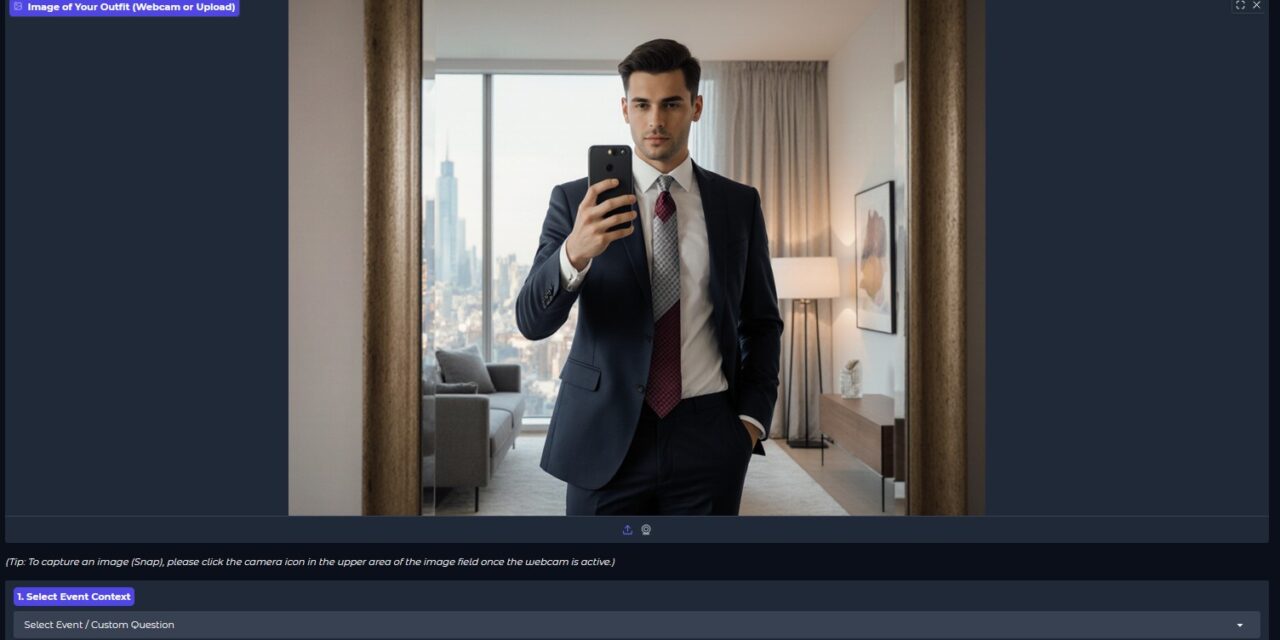
Your Style Dilemma: You stand in front of your closet in the morning, the clock is ticking, and the eternal question burns: Does this outfit work for university, the BBQ, or the first date? Do you need an expensive consultant? No!
We’ll show you how to build your own, local AI Fashion Consultant that gives you instant feedback—from color combination to fit. The core is the multimodal powerhouse Qwen3-VL:32b. The best part? Everything runs on an open-source basis (Ollama), giving you full technological sovereignty.
Style Checker – Challenge
🚀 The Right Outfit for Every Occasion
Your AI stylist is more versatile than you think. It evaluates your outfit not only based on colors but also on material and context. Here are some of the built-in event checks for selecting your clothing:
- 1. Hiking: Practical for the terrain?
- 2. Going Out with a Friend: The perfect balance between style and comfort?
- 3. BBQ with Friends: Is the fabric safe and casual enough for the grill?
- 4. City Tour (Walking): Does the shoe harmonize with the all-day look?
- 5. Beach Day: Does the swimsuit fit the beach aesthetic?
- 7. Formal Dinner: Are texture and cut appropriate for the upscale restaurant?
- 8. Music Concert (Outdoor Festival): Is the layering suitable for temperature changes?
These targeted questions enable the AI model to give precise and useful tips.
🧠 The AI Superpower: Qwen3-VL for Precise Style Analyses
Why is an AI consultant like Qwen3-VL so valuable?
- High-End Precision: With Qwen3-VL:32b, we are using one of the most powerful available multimodal models. Unlike smaller models, it delivers extremely detailed and nuanced style analyses.
- Focus on Contrast: Your AI consultant was specifically trained to pay attention to color contrasts and brightness values (hence the
config.yamlwith the focus on color deficiency!). - Easy Local Use with Ollama: Although Qwen3-VL is a large model, Ollama makes it incredibly easy to install and run on your local computer. A simple
ollama run qwen3-vl:32band your service is ready to go. - Unbiased Feedback: No opinions, just data and logic. The AI provides you with a neutral evaluation and concrete suggestions for changes to perfect your outfit.

Style Checker – young man
🛠️ Tech Check: How Your Personal AI Service Works
The great thing about the Style Checker is the architecture, which is based entirely on Open Source and local execution (keyword: data sovereignty). Here you can see how the five analysis steps interlock:
| Stage | Focus | Tools & Actions |
|---|---|---|
| 1. Frontend & Input | The User Interface | You take a photo (webcam/upload) in the Gradio application. |
| 2. Pre-Processing | Data Preparation | Python converts the image into a Base64 string via PIL and combines it with your prompt and the rules from the config.yaml. |
| 3. Inference & Core Analysis | The AI Power | The Python script sends the entire package to your local Ollama Server (https://ollama.com/).
The Vision LLM Qwen3-VL:32b (Qwen3-VL) analyzes the image and generates the detailed report. |
| 4. Post-Processing | Structuring | Python receives the raw text and uses re (Regex) to automatically extract the most important key figures (Rating, Summary, Change). |
| 5. Output & Presentation | The Result | Gradio uses gr.HTML to display the visual rating (1-10 image graphic), followed by the short summary and the detailed style report. |
📸 Practical Check: Analyzing a Business Look
Let’s look at how the application works in practice. You have uploaded a picture of yourself in the business suit you chose to check if it is suitable for an important meeting. The process in detail:
- Input: In the “Style Checker” tab, you upload your picture. In the “1. Select Event Context” field, you leave the selection on “Select Event / Custom Question”, as the standard question “Is this outfit appropriate for a business meeting? Is the color combination harmonious?” already fits perfectly.
- Processing: As soon as you click on “Start Analysis”, the analysis of your outfit begins:
- The application uploads the image to the server where it is processed further.
- The text prompt and the system rules (focus on color safety for the color blind) are combined and sent to the Qwen3-VL:32b server (Stage 3).
- Inference: The model analyzes the colors of the suit, the contrast to the light wall and the tie. It evaluates whether the cuts (Suitability) and the proportionality are correct.
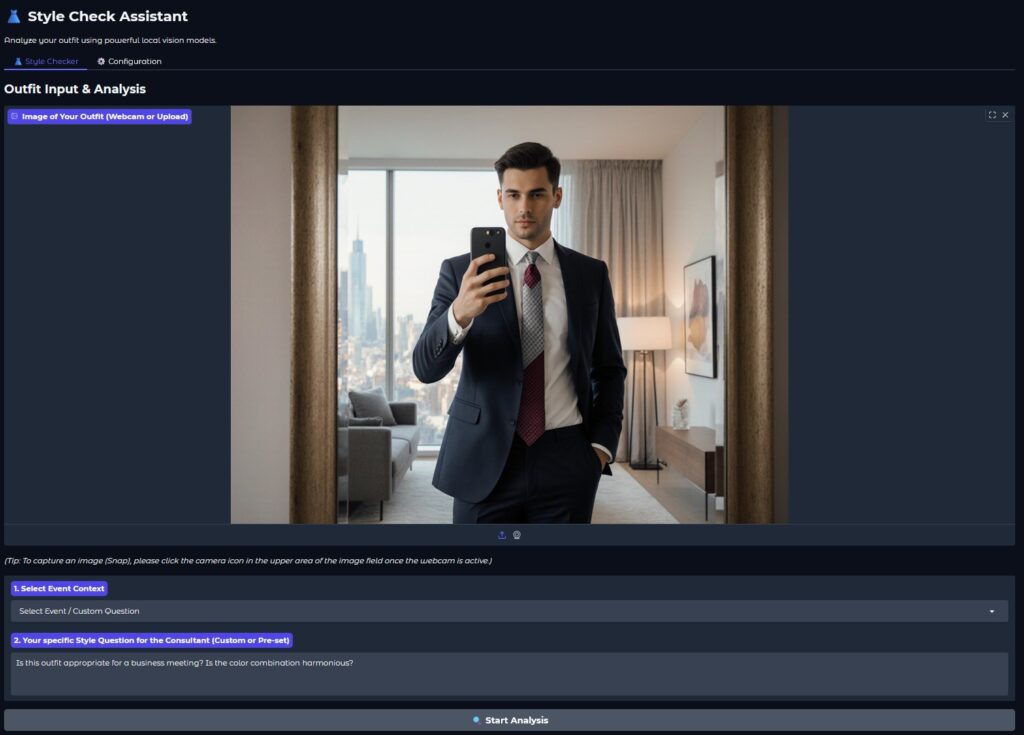
Style Checker analyze
4. Output: The AI returns its results. This text result is immediately divided into the structure of Rating (e.g., a golden 9/10 icon), Key Recommendation, Summary, and the detailed report and displayed.
The result is not just a grade, but an in-depth explanation that immediately tells you whether you can leave the look as is or whether you should choose a different tie.
Here in the following image, the analysis of the young man in the suit that was uploaded for the analysis can be seen.
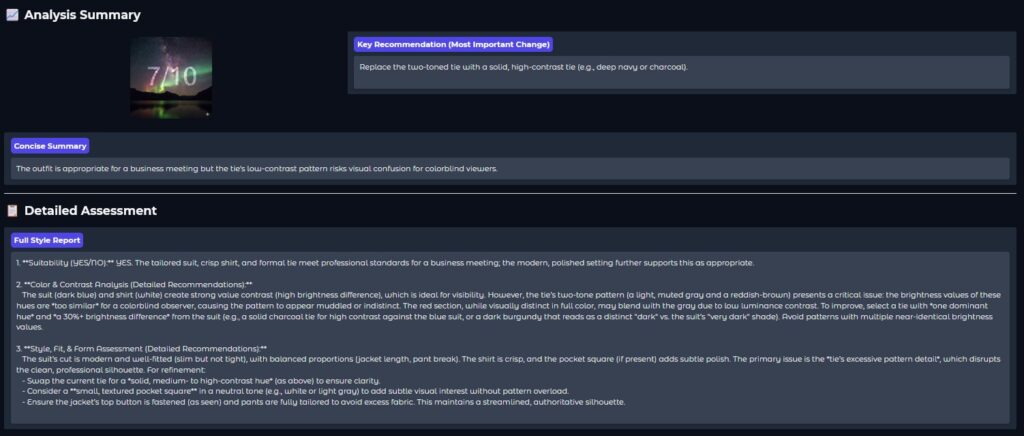
Style Checker analyze result
💡 Your Sovereignty: Control the Code Yourself
This Style Checker shows what is possible with Open Source. You are not dependent on an external cloud service:
- You decide: You choose the model and define the rules in the
config.yaml. - Your data remains private: The image never leaves your local server – a big advantage over cloud solutions.
- Learn the future: By studying the Python code, you can learn the fundamentals for all multimodal AI applications of tomorrow.
Are you ready to take control of your style and your technology? Then start your own Ollama server, run the style_checker.py script, and let the AI revolutionize your wardrobe!





The tutorial offers a clear and practical guide for setting up and running the Tensorflow Object Detection Training Suite. Could…
This works using an very old laptop with old GPU >>> print(torch.cuda.is_available()) True >>> print(torch.version.cuda) 12.6 >>> print(torch.cuda.device_count()) 1 >>>…
Hello Valentin, I will not share anything related to my work on detecting mines or UXO's. Best regards, Maker
Hello, We are a group of students at ESILV working on a project that aim to prove the availability of…