

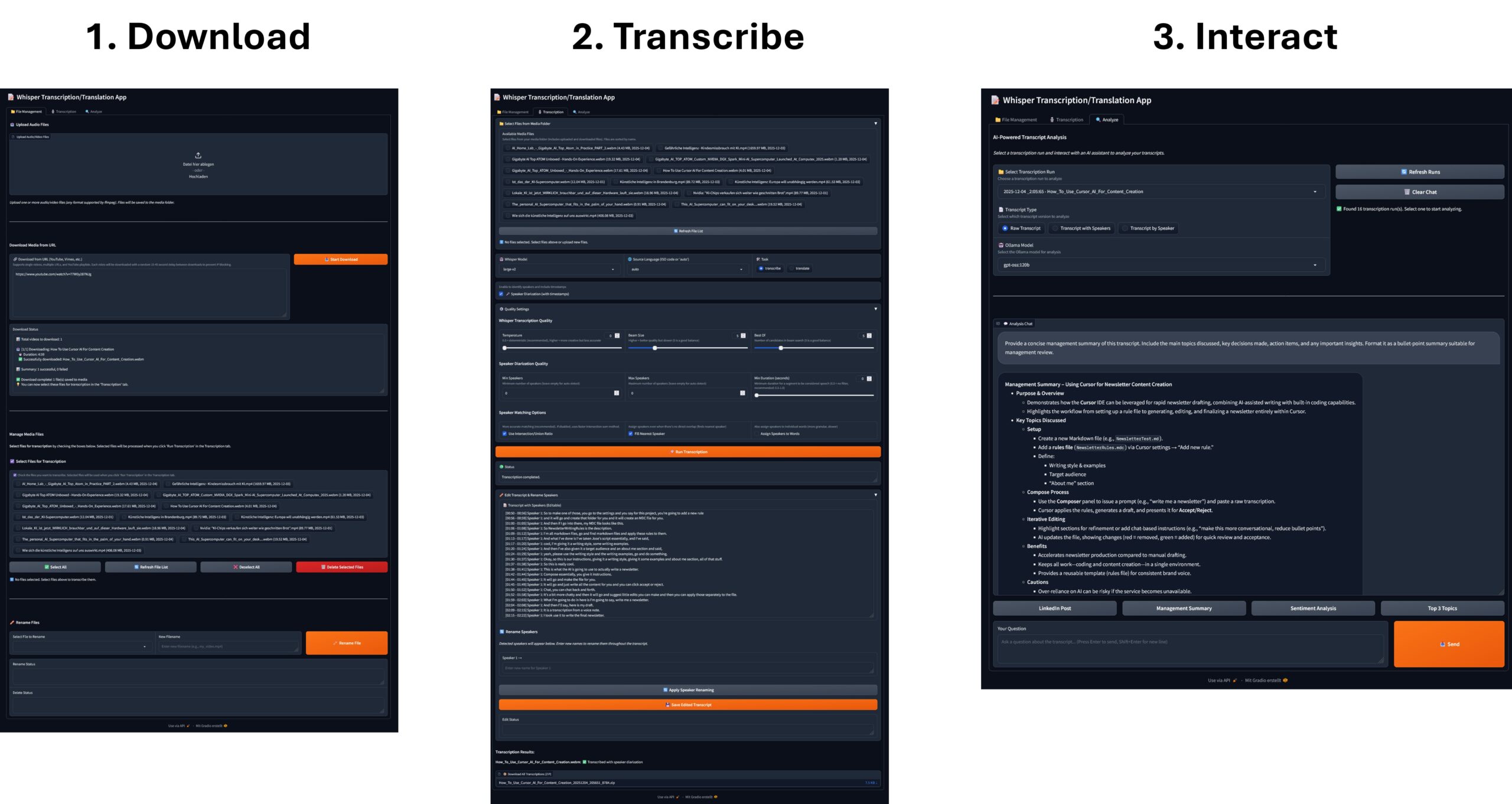
The ability to accurately convert spoken words into text is a game-changer for content creators, researchers, and anyone dealing with meeting recordings, interviews, or video content. But what if you could not only transcribe the words but also instantly know who said what and when?
Welcome to the Whisper + PyAnnote Transcription & Speaker Diarization App—a powerful, web-based tool that brings together the world-class transcription of OpenAI Whisper and the precise speaker identification of PyAnnote.audio, all wrapped in a friendly Gradio interface.
Revolutionize Your Workflow with AI Transcription
This application isn’t just a simple transcription service; it’s a complete media processing and analysis toolkit. It allows you to transform raw audio/video files and media URLs into structured, searchable, and editable transcripts.
Key Capabilities at a Glance
-
Universal Media Downloader: Grab content directly from YouTube, Vimeo, and 1000+ other platforms using
yt-dlp. It even handles entire YouTube playlists with built-in “smart delays” to prevent IP blocking. -
Precision Transcription & Translation: Leverage various Whisper models (from tiny to large-v3) for accurate transcription in 50+ languages or translate any language directly into English.
-
Automatic Speaker Diarization: The star feature! PyAnnote.audio analyzes the conversation, automatically identifying and labeling different speakers.
-
Timestamped Output: Get a precise, timestamped log for every single speech segment, making it easy to jump back to the exact moment a phrase was spoken:
[00:05 - 00:15] Speaker 1: Hello, how are you? -
In-App Editing & Renaming: Tidy up transcripts and rename speakers (e.g., “Speaker 1” to “John”) directly within the web interface.
-
AI-Powered Analysis (Ollama): Chat with your transcript! Use local Ollama models (like Llama 3) to ask questions, summarize interviews, and extract key insights from the text you just generated.
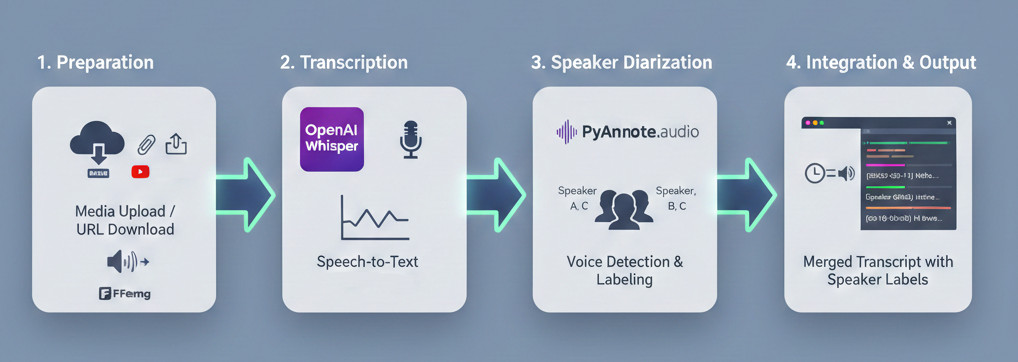
Whisper PyAnnote Diarization App Process
How It Works: The AI Pipeline
The application works by chaining three powerful open-source technologies in a single, seamless pipeline.
-
Preparation: Upload an audio/video file, or paste a URL for the built-in downloader to fetch the content. The media is then pre-processed using FFmpeg to ensure compatibility.
-
Transcription: The Whisper model processes the audio, converting speech to text and generating highly accurate word-level timestamps.
-
Diarization: PyAnnote.audio runs a separate analysis on the audio. It detects changes in voice and assigns unique labels to each distinct speaker.
-
Integration: The application intelligently matches the Whisper segments with the PyAnnote speaker labels based on time overlap, resulting in the final, beautifully formatted, timestamped transcript with speaker identification.
Whisper PyAnnote Diarization App
Technical Advantage: GPU Acceleration
For the best speed and quality, the system automatically detects your NVIDIA GPU and installs the CUDA-enabled version of PyTorch, dramatically accelerating the processing time for both Whisper and PyAnnote.
Getting Started
Ready to experience a whole new level of audio analysis? Here’s what you need to jump in.
📋 Prerequisites
You need a few key components installed on your system before running the app:
-
Python 3.9+
-
FFmpeg: Essential for all audio/video processing.
-
Hugging Face Account & Token: Required to access the powerful, gated PyAnnote models. Don’t forget to accept the terms for the required models on the Hugging Face Hub!
-
Ollama (Optional): Install this if you want to use the AI-Powered Analyze Tab.
🛠️ Installation is Automated!
The project provides an excellent, fully automated installation script (install_whisper_pyannote.sh) for Linux/macOS/WSL that handles everything: creating a virtual environment, installing dependencies, and detecting/setting up GPU support.
After installation, simply configure your Hugging Face Token in the .env file and run:
Command: python whisper_PyAnnote.py
Then, navigate to http://localhost:7111 in your browser, and you’re ready to start transcribing!
The Power of Analysis
The Analyze Tab truly unlocks the value of your transcripts. Instead of manually sifting through hours of text, you can leverage local, privacy-focused AI models via Ollama to:
-
Generate executive summaries of long meetings.
-
Identify key action items and decisions.
-
Ask complex questions about the content (e.g., “What were John’s main concerns about the budget?”).
By combining transcription, speaker ID, and AI analysis, the Whisper + PyAnnote App is a must-have tool for anyone serious about extracting intelligence from spoken data.


The tutorial offers a clear and practical guide for setting up and running the Tensorflow Object Detection Training Suite. Could…
This works using an very old laptop with old GPU >>> print(torch.cuda.is_available()) True >>> print(torch.version.cuda) 12.6 >>> print(torch.cuda.device_count()) 1 >>>…
Hello Valentin, I will not share anything related to my work on detecting mines or UXO's. Best regards, Maker
Hello, We are a group of students at ESILV working on a project that aim to prove the availability of…