

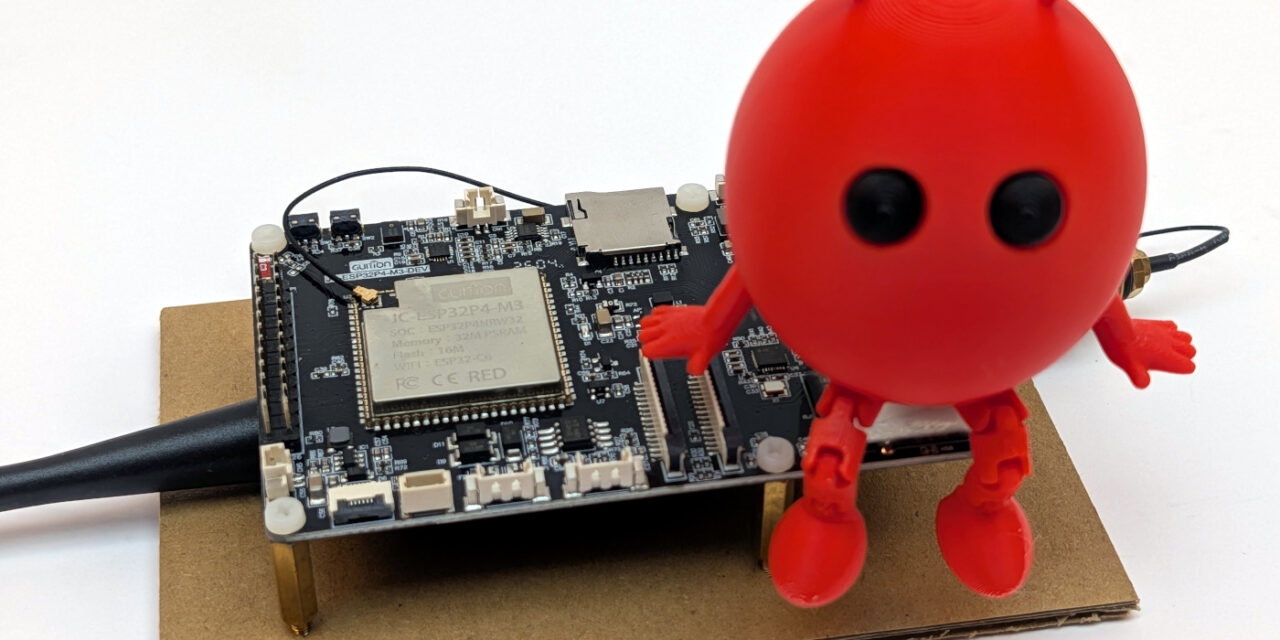
After I showed you in Part 4 of my ESP-Claw series how I got my ESP-Claw agent talking to my local Ollama server for the first time, things settled down for a while. My Guition JC1060P470 is running, talking to Qwen 3.6 35B on my RTX A6000 GPUs, and doing exactly what it should.
But ESP-Claw is a very active open-source project. Espressif commits new features, bug fixes, and capabilities to the repository almost every day. And that raises a very practical question for me as a maker: How do I keep my installation up to date without losing the board adaptation for the JC1060P470 that I worked so hard on?
This update, rebuild, and re-flash workflow is exactly what this post is about. It sounds dry at first, but for me it has become a real maker skill, because I obviously don’t want to lose my configurations the first time I try to update ESP-Claw.
What remains from the setup in Parts 1 through 4?
Before I get started, here’s a quick overview of my setup on my machine to get you back up to speed:
- ESP-IDF v5.5.4 installed at
D:\Programme\Espressif554\ - ESP-Claw repository cloned to
D:\esp32-claw\esp-claw\ - My own board adaptation under
application\edge_agent\boards\guition\jc1060p470_m3_dev\ - menuconfig adjustment for ESP32-P4 chip revision <3.0
- Stored on the board: WiFi credentials, LLM configuration for Ollama, memory files
These four items will be my common thread through the next phases, because each of them I can either keep or accidentally overwrite during the update.
Phase 1: Back up your own board adaptation first
My boards/guition/jc1060p470_m3_dev/ files are probably the most valuable part of the whole setup. The YAML files, the JD9165 init sequence, the sdkconfig defaults — all of that was several evenings of work. If I lose them, I’m not starting “a little” from scratch, but actually completely. I would have to work everything out again from the beginning to figure out how the configuration came together.
That’s why my first thought before every update is: make a backup.
For most makers, the most pragmatic approach is the right one: save the board information as a *.ZIP file.
I created a backups folder inside D:\esp32-claw\ where I want to store the ZIP file. Then I proceeded as follows.
Command: cd D:\esp32-claw\esp-claw\application\edge_agent
Command: Compress-Archive -Path boards\guition -DestinationPath D:\esp32-claw\backups\boards_guition_$(Get-Date -Format yyyyMMdd).zip
This gives me a timestamped ZIP file, and I can restore the state from before the update at any time.
Phase 2: Check ESP-IDF — but only update it if necessary
My second reflex used to be to also bring ESP-IDF up to date during every update. I now advise against that. A new ESP-IDF version can bring its own incompatibilities, and I don’t want to change two variables at the same time during an update.
My approach today:
- First just update ESP-Claw and see whether the current ESP-IDF version (v5.5.4 in my case) is still sufficient
- Only if the build fails with a clear error message like “requires ESP-IDF >= v5.x.x”, install a newer ESP-IDF version afterwards
- The new ESP-IDF version is installed in parallel, not over the old one
Just like I described in Part 2 of the series for v5.5.4.
Phase 3: Update the ESP-Claw repository
Now we get to the actual update. Important: Always work in the “ESP-IDF 5.5 PowerShell”, not in a regular Windows PowerShell.
First I check what state my local repo is in:
Command: cd D:\esp32-claw\esp-claw
Command: git status
If you proceed the way I described here, you’ll probably see your changes listed under “Untracked files” or “Modified files”. I want to take those out of the way first so that git pull runs cleanly:
Command: git stash --include-untracked
git stash puts my local changes aside like a drawer. They’re not gone — I can bring them back later with git stash pop.
Now let’s see what’s new in ESP-Claw:
Command: git fetch
Command: git log HEAD..origin/master --oneline
This gives me a list of all the commits that have been added to the master branch since my last state. For me, that was 47 new commits in just a few days on my first update. That’s a decent amount. If after running that command you end up in a pager with [END] at the bottom of the screen, just press q and you’re back in PowerShell.
Now the actual pull:
Command: git pull --rebase
I use the --rebase flag so that my own commits are cleanly placed on top of the new state instead of creating an ugly merge commit.
Very important afterwards: Update the submodules too, otherwise you’ll end up with a mix of new main code and old submodules.
Command: git submodule update --init --recursive
For me, this step took several seconds because, among others, ESP-Hosted and LVGL brought fresh versions.
Phase 4: Bring back the stash or restore the backup
Depending on the variant from Phase 1, the next step looks different:
The ZIP backup:
Command: Expand-Archive -Path D:\esp32-claw\backups\boards_guition_<date>.zip -DestinationPath .\application\edge_agent\boards\ -Force
This copies my saved board adaptation back into the right place in the updated repo.
If there are merge conflicts now — that happened to me once — git status will show me the affected files. Conflicts in YAML or Kconfig files are usually harmless, because my board adaptation doesn’t change any file that Espressif itself maintains. For conflicts in setup_device.c, however, I would look more closely and check the history of the original with git log.
A practical tip from me: Make sure that after restoring there are no old backup files with the .c extension left in your board directory (for example setup_device_DISPLAY_BACKUP.c). When building, ESP-IDF automatically pulls every .c file from the boards folder into the compilation, and a backup file like that will crash the build with unknown types and unused constants. Just rename such files to .c.bak or remove them from the boards directory entirely.
Phase 5: Don’t forget tooling updates
ESP-Claw ships with the Python tool esp-bmgr-assist, which generates C code from my YAML files. This tool is developed in parallel with the repo, and if I don’t update it along with everything else, my idf.py gen-bmgr-config will run with an outdated version that might not even understand the new schema.
Command: pip install --upgrade esp-bmgr-assist
In my case this resulted in a jump from v0.8.1 to a newer version, and that actually fixed a build error that I otherwise wouldn’t have understood for a long time.
Phase 6: Re-resolve components and re-run gen-bmgr-config
Now I switch into the edge-agent directory:
Command: cd application\edge_agent
With the new submodules and an updated codebase, ESP-IDF may want to re-resolve some of its managed components. A reconfigure triggers this cleanly:
Command: idf.py reconfigure
After that, I run the ESP Board Manager over my YAML files again. This is important because new schema versions occasionally introduce additional required fields that the build would otherwise complain about:
Command: idf.py gen-bmgr-config -c ./boards -b jc1060p470_m3_dev
If at the end I see something like Successfully validated 7 peripherals and Successfully validated 6 devices again, the adaptation is compatible with the current schema. If not, I get a clear error message at this point with the line number in the respective YAML and can fix it precisely. Better now than later in the middle of the build.
Phase 7: Lock in the chip revision permanently
Here’s my most important lesson from the first update: The chip revision adjustment for my old ESP32-P4 v1.3, which I set via menuconfig in Part 2, is gone after an idf.py fullclean. The sdkconfig file is regenerated in the process, and I lose the manual adjustment with it.
The clean solution: add the setting to my sdkconfig.defaults.board. That way it moves into version control and survives every clean build:
# Chip revision range for older ESP32-P4 silicon (Guition JC1060P470 has v1.3)
CONFIG_ESP32P4_REV_MIN_FULL=0
CONFIG_ESP32P4_REV_MAX_FULL_NUM=199
I had already added these two lines at the very end of this file D:\esp32-claw\esp-claw\application\edge_agent\boards\guition\jc1060p470_m3_dev\sdkconfig.defaults.board before the update, and I can only recommend it to anyone using an older P4 board. It saves a step on every rebuild and prevents head-scratching when the firmware suddenly fails to boot.
Anyone with a newer board featuring P4 v3.0+ (ESP32-P4 Function EV Board, M5Stack Tab5) can of course skip this step.
Phase 8: The new build
Now comes the moment of truth:
Command: idf.py build
At this point the update ran for me in two modes:
| Build mode | My duration | When |
|---|---|---|
| Incremental | 1–3 minutes | When only a few files have changed |
| Full rebuild | 8–15 minutes | After submodule updates or idf.py fullclean |
To be honest, after a larger ESP-Claw update a full rebuild is almost always required, because Espressif touches header files deep down and then all dependent modules have to be recompiled.
At the end I see output like this again:
edge_agent.bin binary size 0x2b0760 bytes. Smallest app partition is 0x400000 bytes. 0x14f8a0 bytes (33%) free.
For me the firmware grew slightly after the update to about 2.82 MB with 33 % free space in the app partition. That’s normal because new capabilities bring additional code. As long as there’s still enough space on the app partition, everything is fine.
Phase 9: What survives the flash and what doesn’t?
Before the re-flash, I want to know exactly what on the board survives my update and what doesn’t. And at this point I have to share an honest maker anecdote with you, because this is exactly where I fell into the trap headfirst during my first update.
My first reflex was: “I’ll just use idf.py flash, that will do the right thing.” Wrong thinking. After the flash my provisioning AP esp-claw-000000 was active again, the WLAN password was gone, the Ollama configuration was empty, and my memory files were reset to the default state. I had to go through the entire provisioning from Part 4 again and lost my trained skills.
The reason lies in the flash command that ESP-IDF calls internally. Take a look at the line that idf.py flash actually executes:
esptool.py ... write_flash ...
  0x2000   bootloader/bootloader.bin
  0x8000   partition_table/partition-table.bin
  0x10000  ota_data_initial.bin
  0x20000  edge_agent.bin
  0xb20000 storage.bin     ← ← ← ← ←
The last line is the decisive point: With a normal idf.py flash, ESP-Claw writes a fresh storage.bin to the FATFS partition at 0xb20000, and that overwrites everything stored there. In ESP-Claw, the WiFi credentials, LLM configuration, and memory files actually live in this storage partition, not in NVS as I had originally assumed.
This is what the partitions look like on my 16 MB flash:
| Partition | Content | Survives flash |
Survives app-flash |
|---|---|---|---|
bootloader |
Boot code | Overwritten | Survives |
partition-table |
Partition layout | Overwritten | Survives |
otadata |
Which OTA slot is active | Reset to default | Survives |
ota_0 / ota_1 |
The app firmware (edge_agent.bin) | Active slot is overwritten | Active slot is overwritten |
nvs |
Hardly used by ESP-Claw | Survives | Survives |
storage (FATFS) |
WiFi, LLM config, memory, scripts, router rules | Overwritten! | Survives! |
In plain words: A normal idf.py flash effectively returns my board to factory state, because the storage.bin is flashed along with everything else. That makes sense on the very first flash, but it’s a huge pitfall on every later update.
The clean solution comes from ESP-IDF itself and is called app-flash. This command writes only the app partition with the new edge_agent.bin and leaves all other partitions, especially the storage.bin, untouched:
| Strategy | Command | When useful |
|---|---|---|
| Gentle app update | idf.py -p COM7 app-flash |
Update the app, keep all settings — my default for updates |
| Full flash | idf.py -p COM7 flash |
First flash on a new board or intentional factory state |
| Hard reset | idf.py -p COM7 erase_flash followed by idf.py -p COM7 flash |
For stubborn problems: board fully back to zero |
For every subsequent update I now only use the gentle app-flash variant. I save the full flash for the very first setup run, and the hard reset for cases where the board simply won’t recover.
Phase 10: Re-flash and monitor
Now I connect the board, find the right COM port (COM7 in my case), and start flashing.
To find the right port, you can run the following command.
Command: Get-PnpDevice -Class Ports -PresentOnly | Format-Table FriendlyName, Status
I immediately use the mode that opens the serial monitor right after the flash, and of course app-flash instead of flash:
Command: idf.py -p COM7 app-flash monitor
What I want to see in the boot log is essentially the same as in Part 4:
- PSRAM with 32 MB at 200 MHz octal mode detected
- All peripheral blocks from my YAML initialized
- Both ES8311 codec instances started
- ESP-Hosted host side starts SDIO probe
- ESP32-C6 detected as slave
The decisive difference compared to the very first flash: This time my board connects directly to my home WLAN, because the WiFi credentials in the storage partition have remained untouched. The log no longer shows Provisioning AP active, but goes straight to:
wifi station: connected to <my_SSID>, IP: 192.168.178.161
That’s exactly the result I wanted. No re-provisioning, no captive-portal acrobatics, no fight with Android. The board reappears on the LAN with its known IP address. With Ctrl + ] I can leave the monitor later and get back into PowerShell.
Phase 11: Function check and discovering new capabilities
Via the old LAN IP I open the ESP-Claw web UI and check three things:
- System Settings → LLM: Are my Ollama settings still there? (base URL, model name, timeout)
- Memory: Are Soul, Identity, and User Info still unchanged?
- Capabilities: Have any new capabilities been added that I want to activate?
The third point is what really makes updates exciting for me. With my last update two new capabilities were actually added that I want to look at in more depth later. They are exactly the building blocks I’ll use to connect my robot-car control.
Finally a quick test in the web chat:
Are you still there?
If the answer comes back smoothly, the full chain still works after the update: Browser → ESP-Claw → Ollama → A6000 → Qwen 3.6 → Answer.
My personal conclusion on Part 5
An update workflow sounds like bookkeeping, but for me it has become an important maker discipline. I take three lessons from the first updates:
- Back up your own board adaptation. A simple ZIP backup before every
git pullis the easiest and safest way to make sure nothing gets lost. sdkconfig.defaults.board. Everything that would otherwise need to be set viamenuconfigbelongs in this file — otherwise it won’t survive a clean build and I’d be starting over every time.idf.py app-flashinstead ofidf.py flashon updates. That’s the crucial difference between a gentle firmware update and an accidental factory reset that wipes WiFi, LLM configuration, and memory files.
In the end, sovereign AI also means: being able to maintain your own stack yourself, without depending on a foreign cloud, a foreign update system, or a foreign app store.
In the next part I’ll return to the actual AI topic. I’ll dive deeper into the architecture and look at what capabilities and skills are in detail, how they differ, and how the interplay between LLM, Lua runtime, and hardware works. I need exactly that understanding before I write my own skills to control my robot car.
See you in the next part!
What’s coming in the next posts?
- Part 1: Kickoff and presentation of the vision
- Part 2: Setting up ESP-IDF v5.5.4 and building ESP-Claw — step by step
- Part 3: Adding a new board to ESP-Claw — my board adaptation for the Guition JC1060P470
- Part 4: Connecting ESP-Claw to your own Ollama server — configuration and first chats
- Part 5 (this post): Keeping ESP-Claw up to date — update, rebuild, and re-flash on the Guition JC1060P470
- Part 6: Understanding capabilities and skills — the architecture of an ESP-Claw agent
- Part 7: Writing your own skill — remotely controlling the robot car or explaining the dishwasher
- Part 8: Voice in, voice out — the HMI board as a real voice assistant for the washing machine
- Part 9: Lua scripts for behavior patterns — when the agent acts on its own




The tutorial offers a clear and practical guide for setting up and running the Tensorflow Object Detection Training Suite. Could…
This works using an very old laptop with old GPU >>> print(torch.cuda.is_available()) True >>> print(torch.version.cuda) 12.6 >>> print(torch.cuda.device_count()) 1 >>>…
Hello Valentin, I will not share anything related to my work on detecting mines or UXO's. Best regards, Maker
Hello, We are a group of students at ESILV working on a project that aim to prove the availability of…